
Designing a stunning Arabic calligraphy logo of your name has never been easier. With Google Gemini Pro 3 (Nano Banana) and Grok, you can generate high-resolution 3D logos and smooth golden-light animations within seconds. This guide explains every step clearly and professionally—perfect for beginners, artists, and designers.
Step 1: Open Google Gemini (Pro 3 / Nano Banana)
Go to: https://gemini.google.com/
Inside the message bar, you will see the “Thinking” button on the right side.
Click it and select “Thinking with Pro 3”, also known as Nano Banana.
This mode generates:
- High-quality 3D designs
- Professional calligraphy details
- Hyper-realistic textures
-
8K quality images
Step 2: Paste the High-Resolution 3D Logo Prompt
✔ The prompt below is kept exactly as you provided 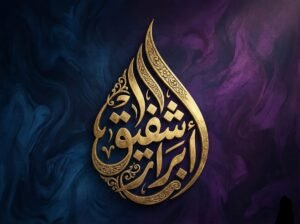 no edits, no changes.
Intricate 3D Arabic calligraphy of the name "ابرار شفیق" forming a vertical flame or teardrop shape. The lettering is crafted from antique brushed gold with delicate internal floral engravings and filigree patterns. The background is a moody, textured abstract canvas blending deep midnight blue on the left and royal purple on the right. Soft, dramatic lighting hitting the gold curves, high contrast, 8k resolution, Islamic art masterpiece, hyper-realistic texture --ar 4:3
This prompt produces:
- 3D molten-gold lettering
- Floral engravings
- Dramatic lighting
- Deep, artistic color gradients
- Ultra-realistic 8K results
-
اگر آپ فری میں سیکھنا چاہتے ہیں یہ واٹسپ چینل جوائن کریں
Step 3: Using the Imagin / Image Button (Gemini)
Gemini also allows you to upload an existing design and improve it automatically.
How to use it:
- Click the Imagin / Image icon under the typing area.
- Upload your calligraphy logo or any reference image.
- Gemini will instantly generate an enhanced version.
- You may ask it to improve lighting, color scheme, engraving details, or texture.
Example commands you can write after uploading:
- “Make this golden texture richer.”
- “Add deeper lighting and high contrast.”
- “Convert this flat calligraphy into 3D.”
Gemini will automatically handle everything.
Master the Art of Urdu & Arabic Calligraphy Using Nano Banana Pro Complete Guide
Step 4: Creating a Calligraphy Logo Animation with Grok
If you want your logo to glow, shine, flow with golden light, or have a cinematic movement, Grok is the perfect tool.
Using Grok for animation:
- Open Grok (web or app).
- Write the animation prompt (your prompt remains 100% unchanged).
- (Optional) Upload your calligraphy image via the image upload button.
- Grok will automatically animate the strokes, light, and curves.
✔ Exact original animation prompt (unchanged):
"Create a luxurious golden-light animation for my calligraphy logo. A bright, warm, flowing golden light should travel smoothly along each letter, following every stroke with precision."
This generates:
- Warm, flowing golden light
- Stroke-accurate movement
- Royal glow effect
- Smooth cinematic animation
Optional: Add More Custom Animations in Grok
If you want to apply custom effects, simply describe what you want:
Examples:
- “Add golden particles around the logo.”
- “Create a slow glowing pulse effect behind the calligraphy.”
- “Add elegant smoke with light reflections.”
Grok will adjust the animation exactly as you request.
Final Step: Enjoy Your Professional 3D Calligraphy Logo
Within seconds, you can create:
✔ Ultra-HD 3D Arabic calligraphy
✔ Golden engraved lettering
✔ Artistic backgrounds
✔ Smooth golden-light animations
✔ Completely custom styles
This workflow is perfect for:
- Social media content
- Branding
- Logo design
- Islamic calligraphy art
- Digital portfolios
